• 1-848-200-0995
  • Log in
  • Cart (0)
  • Checkout
  • Home
  • Shop By Brand 
    • Zooz
    • Aqara
    • Ezlo
    • Fibaro
    • Hubitat
    • Qubino
    • Vision
  • Product Type 
    • Hubs and Controllers 
      • Hubs (Gateway Controllers)
      • Remote Controls
      • Scene Controllers
    • Lighting Controls 
      • Wall Switches
      • Smart Relays
      • Smart Bulbs
      • RGBW and LED Strip Control
    • Sensors 
      • Door / Window Sensors
      • Humidity Sensors
      • Motion Sensors
      • Multisensors
      • Outdoor Sensors
      • Temperature Sensors
      • Vibration Sensors
      • Water Leak Sensors
    • Water Valves
    • Smart Plugs
    • Sirens and Chimes
    • Range Extenders
    • Door Locks
    • Thermostats
    • Blinds and Shades
    • Cameras
    • Accessories
  • Shop By Hub 
    • Z-Box Hub
    • 2GIG
    • ADT
    • Ezlo
    • FIBARO
    • Home Assistant
    • HomeSeer
    • Homey
    • Hubitat
    • Indigo
    • Nexia
    • Qolsys
    • SmartThings
    • Wink
  • Value kits
  • Pro Portal
  • Help 
    • Zooz Support Portal
    • Zooz Community
    • Z-Box Support Portal
    • Z-Wave Resources
    • Blog
    • Contact Us
  • Home
  • Shop By Brand 
    • Zooz
    • Aqara
    • Ezlo
    • Fibaro
    • Hubitat
    • Qubino
    • Vision
  • Product Type 
    • Hubs and Controllers 
      • Hubs (Gateway Controllers)
      • Remote Controls
      • Scene Controllers
    • Lighting Controls 
      • Wall Switches
      • Smart Relays
      • Smart Bulbs
      • RGBW and LED Strip Control
    • Sensors 
      • Door / Window Sensors
      • Humidity Sensors
      • Motion Sensors
      • Multisensors
      • Outdoor Sensors
      • Temperature Sensors
      • Vibration Sensors
      • Water Leak Sensors
    • Water Valves
    • Smart Plugs
    • Sirens and Chimes
    • Range Extenders
    • Door Locks
    • Thermostats
    • Blinds and Shades
    • Cameras
    • Accessories
  • Shop By Hub 
    • Z-Box Hub
    • 2GIG
    • ADT
    • Ezlo
    • FIBARO
    • Home Assistant
    • HomeSeer
    • Homey
    • Hubitat
    • Indigo
    • Nexia
    • Qolsys
    • SmartThings
    • Wink
  • Value kits
  • Pro Portal
  • Help 
    • Zooz Support Portal
    • Zooz Community
    • Z-Box Support Portal
    • Z-Wave Resources
    • Blog
    • Contact Us
THE SMARTEST BLOG

5 TIPS FOR OUR 5 TOP PRODUCTS: #2 AEOTEC MICROSWITCHES

July 30, 2015 15 Comments

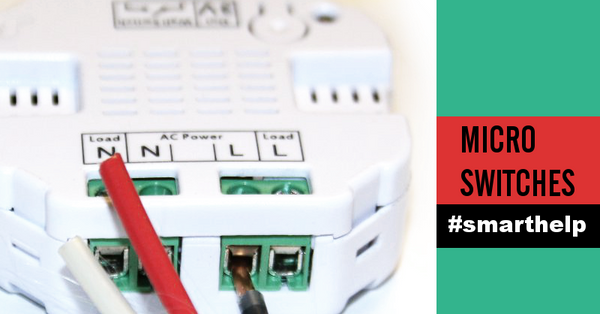
As much as we love Aeon Labs micro switches, they can be a pain to install. Here are the 3 key ingredients for a quick and easy set-up of the switches:

  1. Before inserting the wire, screw the screw in a little or so it catches the thread. If you insert the wire first, the screw will probably miss the thread and get loose. It will feel as if the thread is stripped.
  2. Make sure you have the right type of load connected to the micro switch: NO transformers, at least 20W bulbs or circuits, high-quality dimmable LEDs for the DSC27103 and DSC19103.
  3. Match the in-wall switch with your micro switch correctly - regular on/off switch for DSC26103 and DSC18103 and momentary switch for DSC27103 and DSC19103 (no dimmers!).

Like with any Z-Wave switch, you will need a neutral connection in each gang box to properly install the micros. Speaking of wiring, if you are looking to install the on/off micro switches in a 3-way setting, use the diagram below (anything else you find in the manuals or online will bring you nothing but trouble).
You will need both line and load in the master gang box for the 3-way installation to be successful.


Last but not least, here are a few useful programming adjustments to get the most functionality out of your Aeon Labs micro switches:

- Parameter 120 = 1 set as default for on/off toggle mode OR 0 for momentary switch
- Parameter 3 = 1 for overload protection
- Parameter 80 = 1 to report status change - controller immediately shows status change if you turn the switch on or off manually

Did I miss anything? Let me know in the comments below!


Tweet Share Pin It Email

10 Responses

roger d
roger d

September 13, 2025

Old post I know, but, can you tell me what the difference is between the DSC27103 and DSC19103?

Ron
Ron

May 03, 2019

What is the overload protection! Can it be reset? How?

Jan (The Smartest House)

February 10, 2017

Hi Brent, good question! Just like with any Z-Wave switch, it can be associated with other devices in your network and can be controlled with a virtual add-on switch like the LTM-5 or a Z-Wave scene controller. So you can hide the relays behind a dry wall and decide where and how you want to add local control for them with Z-Wave scene controllers.

Brent
Brent

February 09, 2017

Do you have to connect these to a traditional switch or can you have them controlled by scene controllers / other zwave devices?

Jan (The Smartest House)

February 07, 2017

Hi David, even though Aeotec publishes the live diagrams as an option, we don’t recommend implementing them because in the long run it may damage the switches anyway. If you’re having issues with reliable control, we would try disconnecting the module from the 3-way and see if you can control it from SmartThings as a single-pole to see if the wiring plays a part here.

david
david

February 05, 2017

This was really helpful, I have wired mine up slightly differently (using a 3 way live implementation but it all works except for the fact that i cant seem to reliably turn it off from smartthings. thoughts on what might be the cause?

Jan (The Smartest House)

December 02, 2016

Hi Ann! The Vision dual relay can be connected in a 3-way without live wiring just as shown in the Aeotec diagram. So the most important thing to check for is that you have neutral, ground, line, load, and traveler all in one box. We have a dedicated wiring diagram for the Vision module so feel free to email us about it!

Ann
Ann

November 26, 2016

I have a quick question: can I hook up one of your dual relay to control a 3-way switch?

Jan (The Smartest House)

May 27, 2016

Hi Todd,
Thanks for the question! Dimmers will not work in a 3-way configuration because they are based on the push-button mechanism. So even if you replaced regular switches with momentary, you would still not be able to use a dimmer in this configuration.
We recommend replacing your traditional switches with Z-Wave in-wall dimmers to execute a 3-way configuration. We write more about the process here:
http://www.thesmartesthouse.com/blogs/the-smartest-blog/114982596-wiring-z-wave-switches-do-s-and-don-ts

Let me know if that was helpful!

Todd Kennedy
Todd Kennedy

May 24, 2016

Does the 3/4-way wiring differ for the dimmer modules? Specifically, would I connect load and line to the dimmer module and then use momentary switches in place of the toggle switches in the diagram above? Have you or anyone else got that working? Thanks in advance!

1 2 Next

Leave a comment


Also in THE SMARTEST BLOG

Built to Last: A Beginner's Guide to Z-Wave

June 24, 2026

A cover picture for the Beginner's Guide to Z-Wave Blog showing an alien creature in front of road signs with Z-Wave related terms

You've probably heard the term Z-Wave thrown around if you've been shopping for smart home devices, especially anything related to security systems, door locks, or home automation hubs. But what actually is Z-Wave, and why do so many serious smart home setups rely on it? Here's everything you need to know to get started!

Z-Wave Is Its Own Wireless Network

The most important thing to understand about Z-Wave is that it's completely separate from your home's Wi-Fi. Z-Wave devices communicate on their own low-power radio frequency, which means your smart home traffic isn't competing with your streaming, video calls, or anything else on your internet network.

Continue Reading

The Smart Way to Choose a Smart Switch

June 04, 2026

If you’ve ever tried shopping for smart switches, you already know how quickly things can spiral. What starts as “I just want a smart dimmer for my kitchen” somehow turns into reading about 3-way wiring, traveler wires, load ratings, relay switches, neutral wires, smart bulb mode, and whether your exhaust fan will explode if you accidentally install the wrong dimmer.

And honestly, we get it. Once you open up a switch box and start Googling terms like “single pole vs multi-way” or “line and load,” things can feel overwhelming fast. Instead of forcing you to compare every switch model and decipher electrical terminology on your own, our new guide walks you through the decision process step by step so you can narrow down the right switch for your setup without second guessing yourself.

Continue Reading

Behind the Doors: The Smart Closet That Thinks Ahead

December 26, 2025

If you love a good DIY project and a touch of smart home magic, you’ll be blown away by what YouTuber DIY With Vinny pulled off. His YouTube tutorial transforms a simple closet into a fully automated, jaw-droppingly smart space, from leak detection to mood lighting and robot-friendly automation.

The best part? It’s powered by some seriously smart Zooz Z-Wave gear that makes everything run seamlessly behind the scenes. All of the Zooz devices featured here support the new Z-Wave Long Range protocol, so your smart home stays connected and responsive, even across floors, garages, or detached spaces.

Let’s take a tour of this build and peek at how you can recreate it in your own home.

Continue Reading

Quick Links
  • About Us
  • Privacy Statement
  • Terms Of Service
  • Refund Policy
  • Contact US
Sign up for our newsletter

Be the first to know about new product releases and special sale events.

© 2026 The Smartest House.

American Express Diners Club Discover Google Pay Mastercard Shop Pay Visa