• 1-848-200-0995
  • Log in
  • Cart (0)
  • Checkout
  • Home
  • Shop By Brand 
    • Zooz
    • Aqara
    • Ezlo
    • Fibaro
    • Hubitat
    • Qubino
    • Vision
  • Product Type 
    • Hubs and Controllers 
      • Hubs (Gateway Controllers)
      • Remote Controls
      • Scene Controllers
    • Lighting Controls 
      • Wall Switches
      • Smart Relays
      • Smart Bulbs
      • RGBW and LED Strip Control
    • Sensors 
      • Door / Window Sensors
      • Humidity Sensors
      • Motion Sensors
      • Multisensors
      • Outdoor Sensors
      • Temperature Sensors
      • Vibration Sensors
      • Water Leak Sensors
    • Water Valves
    • Smart Plugs
    • Sirens and Chimes
    • Range Extenders
    • Door Locks
    • Thermostats
    • Blinds and Shades
    • Cameras
    • Accessories
  • Shop By Hub 
    • Z-Box Hub
    • 2GIG
    • ADT
    • Ezlo
    • FIBARO
    • Home Assistant
    • HomeSeer
    • Homey
    • Hubitat
    • Indigo
    • Nexia
    • Qolsys
    • SmartThings
    • Wink
  • Value kits
  • Pro Portal
  • Help 
    • Zooz Support Portal
    • Zooz Community
    • Z-Box Support Portal
    • Z-Wave Resources
    • Blog
    • Contact Us
  • Home
  • Shop By Brand 
    • Zooz
    • Aqara
    • Ezlo
    • Fibaro
    • Hubitat
    • Qubino
    • Vision
  • Product Type 
    • Hubs and Controllers 
      • Hubs (Gateway Controllers)
      • Remote Controls
      • Scene Controllers
    • Lighting Controls 
      • Wall Switches
      • Smart Relays
      • Smart Bulbs
      • RGBW and LED Strip Control
    • Sensors 
      • Door / Window Sensors
      • Humidity Sensors
      • Motion Sensors
      • Multisensors
      • Outdoor Sensors
      • Temperature Sensors
      • Vibration Sensors
      • Water Leak Sensors
    • Water Valves
    • Smart Plugs
    • Sirens and Chimes
    • Range Extenders
    • Door Locks
    • Thermostats
    • Blinds and Shades
    • Cameras
    • Accessories
  • Shop By Hub 
    • Z-Box Hub
    • 2GIG
    • ADT
    • Ezlo
    • FIBARO
    • Home Assistant
    • HomeSeer
    • Homey
    • Hubitat
    • Indigo
    • Nexia
    • Qolsys
    • SmartThings
    • Wink
  • Value kits
  • Pro Portal
  • Help 
    • Zooz Support Portal
    • Zooz Community
    • Z-Box Support Portal
    • Z-Wave Resources
    • Blog
    • Contact Us
THE SMARTEST BLOG

Built to Last: A Beginner's Guide to Z-Wave

June 24, 2026

A cover picture for the Beginner's Guide to Z-Wave Blog showing an alien creature in front of road signs with Z-Wave related terms

You've probably heard the term Z-Wave thrown around if you've been shopping for smart home devices, especially anything related to security systems, door locks, or home automation hubs. But what actually is Z-Wave, and why do so many serious smart home setups rely on it? Here's everything you need to know to get started!

Z-Wave Is Its Own Wireless Network

The most important thing to understand about Z-Wave is that it's completely separate from your home's Wi-Fi. Z-Wave devices communicate on their own low-power radio frequency, which means your smart home traffic isn't competing with your streaming, video calls, or anything else on your internet network.

That separation matters more than it might seem. Wi-Fi networks get congested. They're designed for high-bandwidth tasks, not for dozens of small devices constantly sending short status updates. Z-Wave is built specifically for that kind of low-overhead, reliable communication, and it shows in how consistently it performs as your system grows.

Z-Wave has been around since 2001, purpose-built for smart home device communication from the start rather than adapted from a protocol designed for something else. It's now managed by the Z-Wave Alliance, a standards organization made up of manufacturers, developers, and technology companies whose shared goal is making sure Z-Wave devices work together reliably regardless of who made them.

 See the Z-Wave certified product catalog here: 

That last part is enforced, not just encouraged.  Every device that carries the Z-Wave certification mark has gone through a mandatory testing process conducted by independent, accredited test labs.  Manufacturers can't self-certify and call it done. Devices are physically submitted, tested against the full Z-Wave specification, and only issued a certification number once they pass. That certification also has to be maintained over the product lifecycle, meaning if a firmware update changes how a device behaves, it may need to go back through testing. The result is that when you see the Z-Wave logo on a product, cross-brand compatibility isn't a maybe. It's been verified.

That's why a Zooz sensor can trigger a switch from a completely different brand without any custom integration work. Everything in the ecosystem has been held to the same standard.

It's also why Z-Wave is the protocol behind professional-grade security platforms like ADT, Vivint, and Alarm.com, where "mostly works" isn't good enough.

How Z-Wave Devices Actually Talk to Each Other

At the center of any Z-Wave system is a hub (sometimes called a controller). The hub is the brain that coordinates communication, runs automations, and connects everything together. Popular hubs include Z-Box, Home Assistant, HomeSeer, Hubitat, SmartThings, and Homey, among others.

But here's where Z-Wave gets interesting: not all devices communicate with the hub the same way. Modern Z-Wave systems use two complementary networking models depending on what a given device needs.

Mesh Networking: The Foundation

Z-Wave's original architecture is built on a mesh network. In a mesh, powered devices like wall switches, smart plugs, and in-wall modules don't just send signals to the hub. They also relay signals on behalf of other devices nearby. These devices are called repeaters, and they form the backbone of a healthy Z-Wave mesh.  Every mains-powered Z-Wave device functions as a repeater automatically, with no configuration required. Think of it like a chain of people passing a message across a room. If one path is blocked, the network automatically finds another route.  This self-healing quality is what makes mesh so well-suited to real homes, where walls, floors, and distance all get in the way.

One thing worth knowing about how mesh routing works: Z-Wave limits any signal to a maximum of four hops between a device and the hub. A hop is each time a signal passes through a repeater on its way to its destination. Four hops covers a lot of ground in a typical home when devices are placed thoughtfully, but it's a good reason to distribute mains-powered devices throughout your space rather than clustering them in one area. More repeaters in the right places means shorter, more direct routes rather than long relay chains that push against that ceiling.

Battery-powered devices like sensors, door locks, and remotes are called end nodes, and they operate differently within a mesh network. Because they run on battery, they spend most of their time in a sleep state to conserve power and only wake up briefly to receive a signal from the hub when needed. End nodes do not repeat signals for other devices, and they can only receive messages from the hub when they're awake.

Something to keep in mind as you get started: if you want to update a parameter on a battery-powered device, add it to a new scene, perform a firmware update, or refresh its network routing, the device needs to be awake to receive the change from the hub. For most sensors and locks, that means manually waking the device, usually by pressing a button on it, immediately after making the change in your hub. The hub queues the command, the device wakes up, and the update goes through. It's completely normal Z-Wave behavior, and knowing to expect it makes the whole experience a lot smoother.

Z-Wave Long Range: For the Edges

Z-Wave Long Range (ZWLR) is a newer addition to the protocol and works quite differently. Instead of hopping between multiple devices to reach the hub, ZWLR devices communicate directly with the hub over much greater distances.

 This isn't a replacement for mesh, it's an expansion. Mesh is great for dense indoor environments where you have plenty of repeaters. ZWLR is ideal for the places where that falls apart: detached garages, outbuildings, gate sensors, outdoor lighting, or anywhere far from the main house. 

The added benefit beyond raw distance is efficiency. By removing the multi-hop relay chain entirely, ZWLR devices reduce the amount of background traffic on the network, which keeps communication cleaner and more predictable as the system grows.

Modern Z-Wave systems can use both models within the same network, but the choice happens at inclusion. When you add a device that supports ZWLR, you'll select whether to include it as a ZWLR device or a standard mesh device at that time. You can always exclude and reinclude a device to change methods, but it's worth thinking about placement and purpose going in.

That flexibility is actually one of the more compelling things about modern Z-Wave. A single hub can manage both mesh and ZWLR devices simultaneously, which means you can build a dense, resilient mesh inside your home while also reaching outbuildings, gates, or far corners of your property with ZWLR devices that talk directly to the hub. The two approaches complement each other, and being able to use both on the same network means you're not forced to compromise based on your home's layout.

 Want to learn more about ZWLR? Read our "All About Z-Wave Long Range" blog here:

Command Classes: The Shared Language

Every Z-Wave device, regardless of brand, communicates using a standardized set of rules called command classes. You'll never configure these manually since they're baked into every certified device, but understanding what they are helps explain why Z-Wave works the way it does across such a wide range of products from different manufacturers.

Think of command classes as a shared vocabulary. When a Z-Wave device joins your network, it tells your hub exactly which command classes it supports. The hub uses that information to know what the device can do and how to interact with it. A switch that supports the Basic command class can be turned on and off. One that also supports the Meter command class can report energy consumption. A sensor supporting the Notification command class can send structured alerts for events like motion detected, door opened, or water leak.

This is different from how many other smart home ecosystems work, where compatibility often depends on a manufacturer writing a specific integration or plugin.  With Z-Wave, the command class framework handles that at the protocol level. A Zooz switch and a thermostat from a completely different brand are already speaking the same language before any hub-side configuration happens. 

Command classes also come in versions, and newer versions typically add capabilities or refine how information is reported. A hub that supports a higher version of a command class can take advantage of more detailed data from a device that implements it, while still communicating with older devices that only support an earlier version. This is part of how Z-Wave maintains backward compatibility across a product ecosystem that spans more than two decades.

There are dozens of command classes covering everything from basic switching and dimming to color control, door lock operation, binary sensors, multilevel sensors, configuration parameters, firmware updates, and more. Most users never need to think about any of this directly, but it's the reason a Z-Wave system can handle such a wide variety of device types in a consistent, reliable way.

Device Parameters: Customizing How a Device Behaves

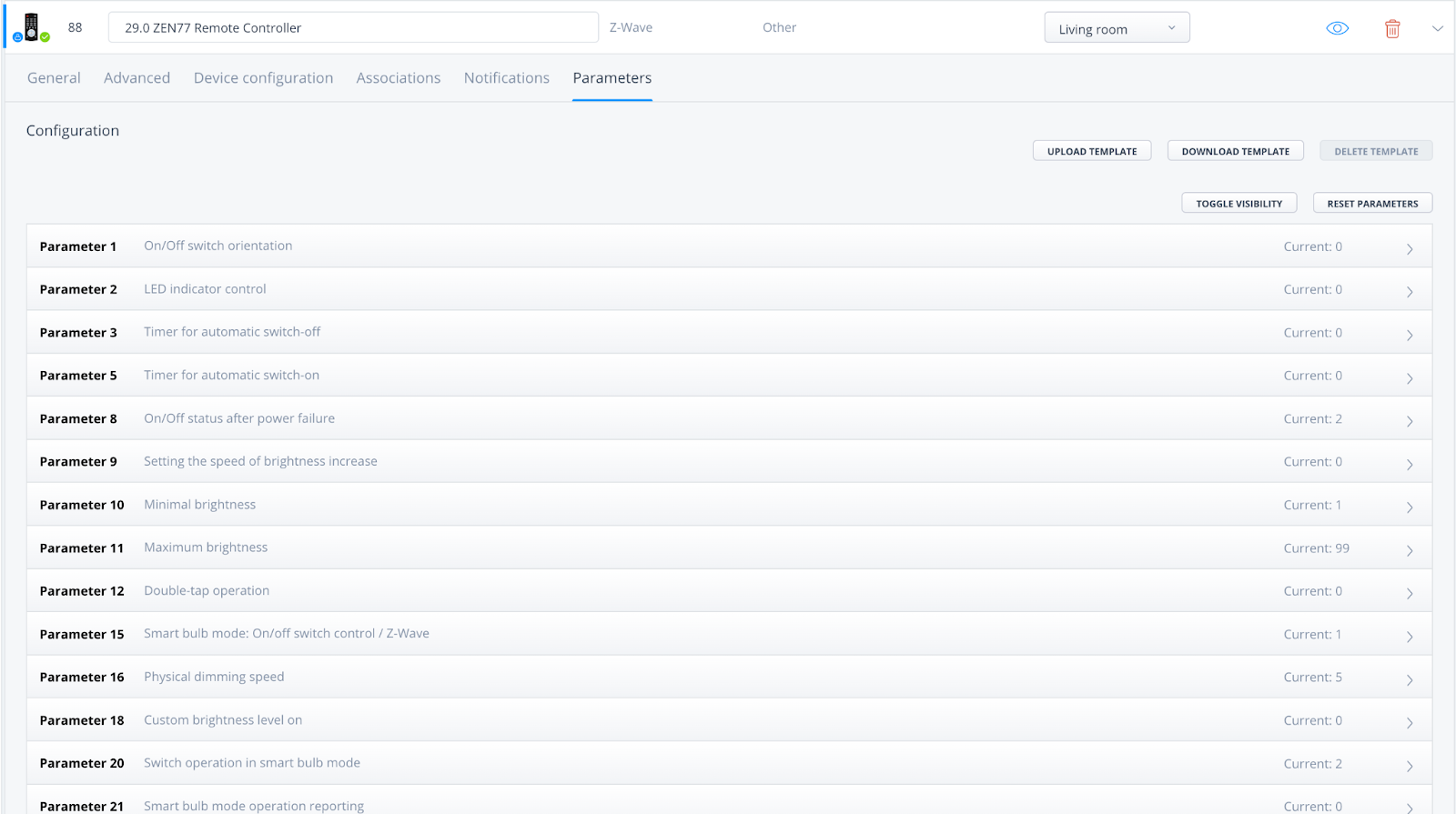
Beyond command classes, most Z-Wave devices also have a set of parameters that let you customize how they behave. Depending on which hub you use, you might see these called settings, preferences, or simply parameters, but they refer to the same thing.

The key thing to understand about parameters is that they define how a device behaves all the time, not in response to a specific trigger or condition. If you want a device to do something only sometimes, like turn on when motion is detected or adjust based on time of day, that belongs in a scene or automation. Parameters are for the baseline: how the device operates by default, every time, regardless of context.

Parameters vary widely by device type.  A motion sensor might let you adjust detection sensitivity or the timeout before it reports clear. A smart switch might have parameters for LED indicator behavior or how it responds after a power outage. A dimmer might let you set minimum and maximum brightness levels or ramp rate. These settings apply constantly, forming the foundation on top of which your automations run. 

These aren't features added by the hub. They're built into the device itself and announced to the hub during the inclusion process. When you add a Z-Wave device to your network, the device transmits its full profile: the command classes it supports, its parameter list, the accepted values for each parameter, and on 700 series hardware and newer, even the plain-language labels for each setting. The hub receives all of this automatically.

What happens with that information after inclusion depends entirely on the hub, which leads to one of the more important practical distinctions in the Z-Wave ecosystem.

 Check out how to manage and adjust Z-Wave device parameters on the Z-Box Hub (click on the screenshot to read the full guide): 

Screenshot of the Z-Box Hub advanced Z-Wave parameter view

How Hubs Handle Z-Wave Devices

Because Z-Wave is a standardized protocol, any hub that properly follows the Z-Wave specification should be able to recognize any certified Z-Wave device for what it is, communicate with it, and surface its capabilities without requiring any special integration or custom code. That's the promise baked into the protocol.

 In practice, hubs vary considerably in how much of that they actually deliver to the user. Hubs like Home Assistant, HomeSeer, and the Z-Box Hub are designed around a philosophy that closely follows how the Z-Wave specification intends devices to present themselves.  When you include a device, the hub reads the information the device announces about itself and presents it directly in the interface. Parameters show up with their labels and accepted values. Command classes are recognized and usable. If a firmware update adds new parameters to a device, those show up too, because the hub is reading from the device rather than from a static integration file. There's no extra step between inclusion and full functionality.


SmartThings takes a different approach. While the underlying Z-Wave communication still works at the protocol level, SmartThings generally requires a device to have a dedicated integration or custom driver before its parameters and advanced capabilities are displayed correctly in the app. The information is technically present after inclusion, but the hub doesn't surface it in a usable way without that additional layer. This means that when a new Zooz device is released, or when an existing device receives a firmware update with new features, users may need to wait for a driver update or install a community-written driver to access everything the device can do.

Hubitat can work similarly to SmartThings in this regard, though it gives users more flexibility to install community drivers and tends to be closer to the hardware than SmartThings. Some devices work fully out of the box with Hubitat's built-in drivers, while others benefit from a community-written alternative to expose all parameters.

Homey works in yet another way, using an app-based model for device integrations. Dedicated apps determine how devices are presented and controlled within the platform. In some cases, those apps carry the name of the device manufacturer, which can create the impression that the manufacturer controls every aspect of the integration. In reality, updates to app functionality and support for new device features follow the development and release cycle of the app itself. As a result, newly added capabilities or bug fixes may not always appear at the same pace as updates to the device firmware. Homey users generally enjoy a polished experience, but it's another example of how the platform layer can influence how much of a device's functionality is available and when.

 It's also worth noting that dedicated alarm and security panels occupy their own category when it comes to Z-Wave hub behavior. Platforms like Alarm.com, ADT, Vivint, and others used by professional security installers are certified to work with Z-Wave devices, but their ecosystems are typically more controlled by design.  They prioritize rock-solid reliability and may limit which third-party devices can be added or what parameters are exposed, as part of maintaining that stability. If you're running Z-Wave through a professionally monitored alarm system, your experience will look different from a DIY hub setup, and that's by design rather than a limitation.

Understanding these differences helps set realistic expectations and makes it easier to choose a platform that matches how hands-on you want your smart home experience to be.

Scenes and Automations: Where It Comes Together

Once your devices are connected, this is where Z-Wave stops feeling like a technology project and starts feeling like a home that works the way you want it to.

Think about how you actually move through your home. You wake up, leave for work, come home, wind down for the night. Each of those moments has a natural set of things you want your home to do, and the best way to think about it is in terms of those moments rather than individual devices. You're not really trying to control a thermostat or a lock in isolation. You're trying to leave for work, arrive home, or go to bed. Scenes are how you translate those moments into action.

A scene is a group of actions that execute together. Rather than controlling devices one at a time, a scene lets you group any combination of devices and actions and trigger them all at once.  A Goodnight scene might lock the front door, turn off every light, lower the thermostat, and arm the security system, all from a single tap, a voice command, or automatically at a set time. A Movie Night scene could dim the living room lights to a specific level, turn off the kitchen, and do it all the moment you press a button on a remote. 

Automations take that further by adding logic. Where a scene is a fixed set of actions, an automation adds conditions and triggers that determine when and whether those actions run. The lights in your entryway might turn on when a motion sensor detects movement, but only after sunset and only when the security system is in home mode. Your thermostat might adjust when you leave in the morning based on your phone's location. A leak sensor in the basement could trigger a siren alert, activate a connected water shutoff valve, and send a notification to your phone simultaneously.

 One aspect of Z-Wave automations that doesn't get talked about enough is that all of this processing happens locally, on your hub, without sending data to the cloud.  That means your automations run even when your internet is down, they respond faster because there's no round trip to a remote server, and your device activity stays within your own home network. For automations tied to security devices like locks, sensors, and alarm contacts, that local processing is a meaningful privacy and reliability advantage.

The reason this all works so smoothly across a Z-Wave system is that all of your devices, regardless of brand, are speaking the same language through the hub. A Zooz motion sensor doesn't need a special integration to trigger a door lock from another manufacturer. The hub understands both devices natively and can coordinate between them freely. That's a meaningful difference from ecosystems where cross-brand automations require workarounds or simply don't work at all.

 It's also worth remembering the distinction from the parameters section: automations handle the conditional, situational behaviors. Parameters handle how devices behave all the time.  The two layers work together, with parameters forming the foundation and automations building the intelligence on top of it. Getting both right is what turns a collection of smart devices into a system that genuinely makes daily life easier.

Direct Association: Device-to-Device Communication

Direct association is a feature available on mesh-based Z-Wave devices that allows one device to send a command directly to another without involving the hub at all. It's one of those features that sounds simple on the surface but has some nuances worth understanding before you try to build around it.

The way it works is overall straightforward. A sending device, typically something like a switch, remote, or sensor, is configured to send a basic command directly to one or more receiving devices when it's triggered. The original configuration happens through your hub, but once it's set up, the hub steps out of the picture, as the two devices communicate directly over the Z-Wave network without any processing in the middle.

The most commonly cited benefit is speed. Because the command doesn't route through the hub, the response is nearly instant. A wall switch with a direct association to a smart bulb will feel essentially the same as a traditional wired switch. For physical controls where any perceptible delay would be noticeable, that responsiveness is genuinely useful.

 Most devices that support direct association allow you to configure multiple receiving devices in what are called association groups. A single button press on a remote could simultaneously trigger a light switch in one room, a dimmer in another, and a smart plug elsewhere.  Each device in the group receives the same basic command at the same time.

Zooz 800 Series Z-Wave Long Range Wall Remote ZEN37 800LR scene examples

The important limitation to understand is that direct association is a one-way street. The sending device issues a basic command, typically on, off, or a dim level, but it receives no feedback from the receiving device and has no way of knowing whether the command was carried out or what state the receiving device is now in. If the receiving device was already on when the on command arrived, it stays on. If the command didn't make it through for any reason, the sending device has no way of knowing. There's no confirmation, no status sync, and no error handling.

This is why direct association works well for simple, predictable use cases and less well for anything that requires logic, conditions, or awareness of device state. If you need a sensor to trigger a light only after sunset, or a switch to control a device differently based on time of day or security mode, that belongs in an automation through the hub. Direct association doesn't have the ability to evaluate conditions. It just sends a command.

 It's also worth keeping in mind that direct association only applies to mesh devices.  Z-Wave Long Range devices communicate directly with the hub by design, so the device-to-device model that makes direct association possible doesn't apply to them.

Why Z-Wave Has Stuck Around for Over 20 Years

Every few years a new wireless protocol gets introduced as the next big thing in smart home technology. Matter and Thread are the most recent examples, and they're worth paying attention to. But longevity in this space isn't about hype cycles. It's about whether a protocol was built to do one thing exceptionally well and has continued to earn that trust over time. That's the story of Z-Wave.

A big part of that story is security. Z-Wave's S2 security framework uses AES-128 encryption, the same standard used by banks, government agencies, and the US military for classified communications, and it's been mandatory on all newly certified Z-Wave devices since 2017. The S2 framework also protects the pairing process itself, using a device-specific key printed on each product to authenticate inclusion and prevent anyone from intercepting or spoofing the connection. For devices that control door locks, alarm sensors, and access points in your home, that level of security isn't a bonus feature. It's the baseline.

It's also why Z-Wave is the protocol of choice for professional security platforms like ADT, Vivint, and Alarm.com. These are systems where reliability and security aren't optional, and they've built their ecosystems on Z-Wave for that reason. That kind of institutional trust doesn't happen by accident and doesn't transfer easily to newer protocols that haven't been tested at the same scale over the same period of time.

Image showing a character flying over a town with a z-wave cape with thumbs up

The Z-Wave Alliance and its certification program are a big part of why that trust exists at all. The Z-Wave Alliance brings together manufacturers, developers, and technology companies under a shared set of standards, and the certification process ensures those standards are actually met. That foundation creates something unusual in the smart home world: a genuine ecosystem where companies that compete with each other still build products that work together seamlessly.  Zooz devices work with locks from one manufacturer, thermostats from another, and sensors from a dozen others, not because everyone agreed to play nicely, but because the protocol and certification process require it. Those cross-brand partnerships and integrations raise the ceiling for what any single device can do inside a well-built system. 

Beyond security, Z-Wave has stayed relevant because of how it was designed from the ground up. It operates on a dedicated frequency separate from Wi-Fi, Zigbee, Bluetooth, and other 2.4GHz traffic, which means it doesn't compete for airspace with the rest of your home network. It prioritizes local control, so your devices work even when your internet is down. And its backward compatibility means a device purchased today will work alongside devices from years ago and likely with devices that haven't been made yet.

New protocols will keep emerging, and some will earn their place in the ecosystem. But for a home automation foundation that has been proven in professional security systems, hardened with serious encryption, and refined over more than two decades of real-world use, Z-Wave remains the standard that others are measured against.

Where To Start

The best thing about building a Z-Wave system is that you don't have to have it all figured out before you begin. Start with a hub and a few mains-powered devices like smart switches or plugs, which immediately give you both functional control and the foundation of a mesh network. As you get comfortable with how things work, you can layer in sensors, locks, and other devices where they make sense, and build out automations that match the way you actually live. Each addition strengthens the system without requiring you to rethink what came before.

It's also worth knowing that  most Z-Wave hubs support other wireless protocols alongside Z-Wave, so you're never locked into a single technology. Home Assistant is a good example of what that looks like in practice, handling Z-Wave, Zigbee, Matter, Wi-Fi devices, and more from a single interface.  That kind of flexibility lets you lean on Z-Wave where reliability matters most, your locks, sensors, and security devices, while still incorporating other technologies wherever they fit naturally into your setup.

At the end of the day, Z-Wave has stayed at the center of the smart home world for over two decades because it was built to solve a real problem and it does so without compromise. Bank-grade encryption, a certification process that guarantees cross-brand compatibility, a mesh architecture that gets stronger as it grows, and a track record that spans everything from first-time DIY setups to professionally monitored security systems in millions of homes. If you're building a smart home you can actually rely on, Z-Wave is where that foundation starts. And with Z-Wave Long Range, the network infrastructure can spread beyond a single building into new verticals where reliable automation around energy and security can bring enormous savings. Think MDU (multi-dwelling units), commercial spaces, and more.

If you're ready to take the next step, The Smartest House carries a full range of Z-Wave devices, including Zooz, our in-house brand, along with products from other leading Z-Wave manufacturers. Take your time browsing, and don't hesitate to reach out if you have questions. We're here to help.


Tweet Share Pin It Email

Leave a comment


Also in THE SMARTEST BLOG

The Smart Way to Choose a Smart Switch

June 04, 2026

If you’ve ever tried shopping for smart switches, you already know how quickly things can spiral. What starts as “I just want a smart dimmer for my kitchen” somehow turns into reading about 3-way wiring, traveler wires, load ratings, relay switches, neutral wires, smart bulb mode, and whether your exhaust fan will explode if you accidentally install the wrong dimmer.

And honestly, we get it. Once you open up a switch box and start Googling terms like “single pole vs multi-way” or “line and load,” things can feel overwhelming fast. Instead of forcing you to compare every switch model and decipher electrical terminology on your own, our new guide walks you through the decision process step by step so you can narrow down the right switch for your setup without second guessing yourself.

Continue Reading

Behind the Doors: The Smart Closet That Thinks Ahead

December 26, 2025

If you love a good DIY project and a touch of smart home magic, you’ll be blown away by what YouTuber DIY With Vinny pulled off. His YouTube tutorial transforms a simple closet into a fully automated, jaw-droppingly smart space, from leak detection to mood lighting and robot-friendly automation.

The best part? It’s powered by some seriously smart Zooz Z-Wave gear that makes everything run seamlessly behind the scenes. All of the Zooz devices featured here support the new Z-Wave Long Range protocol, so your smart home stays connected and responsive, even across floors, garages, or detached spaces.

Let’s take a tour of this build and peek at how you can recreate it in your own home.

Continue Reading

Sprinkle Some Smarts: How to Automate Your Yard on a Budget

August 11, 2025 5 Comments

Smart home tech isn’t just for indoors anymore—it’s transforming yard care too. While we’re used to voice assistants and smart thermostats, outdoor tools like sprinkler systems are catching up. Instead of wasting water on rigid schedules, smart systems adapt to the weather, skip rainy days, and keep your lawn healthy with minimal effort.

Smart sprinkler control makes it easy to upgrade your existing irrigation system with a device like the Zooz ZEN17 Universal Relay. Compatible with SmartThings, Hubitat, Z-Box, Home Assistant, and HomeSeer, it fits into most smart home setups without locking you into one platform. This post covers the benefits of automating your sprinklers, how to set up the ZEN17, control options, and real user tips to help you get the most from your system.

Continue Reading

Quick Links
  • About Us
  • Privacy Statement
  • Terms Of Service
  • Refund Policy
  • Contact US
Sign up for our newsletter

Be the first to know about new product releases and special sale events.

© 2026 The Smartest House.

American Express Diners Club Discover Google Pay Mastercard Shop Pay Visa