$34.95 $44.95
| /
NOTE: Z-Wave gateway controller required - sold separately. *Your hub needs to support advanced parameter input to display these features.
We may have this product available in open box, refurbished, or used condition - just check the variant buttons under the product price for availability. All of our recycled inventory has been tested for both manual and Z-Wave control and is fully functional at the time of shipment. Here is what you can expect when ordering your device:
Download the Manual for Zooz Z-Wave Plus S2 Double Switch ZEN30 800LR (PDF)
NOTE: If you don't see your Z-Wave controller on the list above, please contact us before you purchase this product.
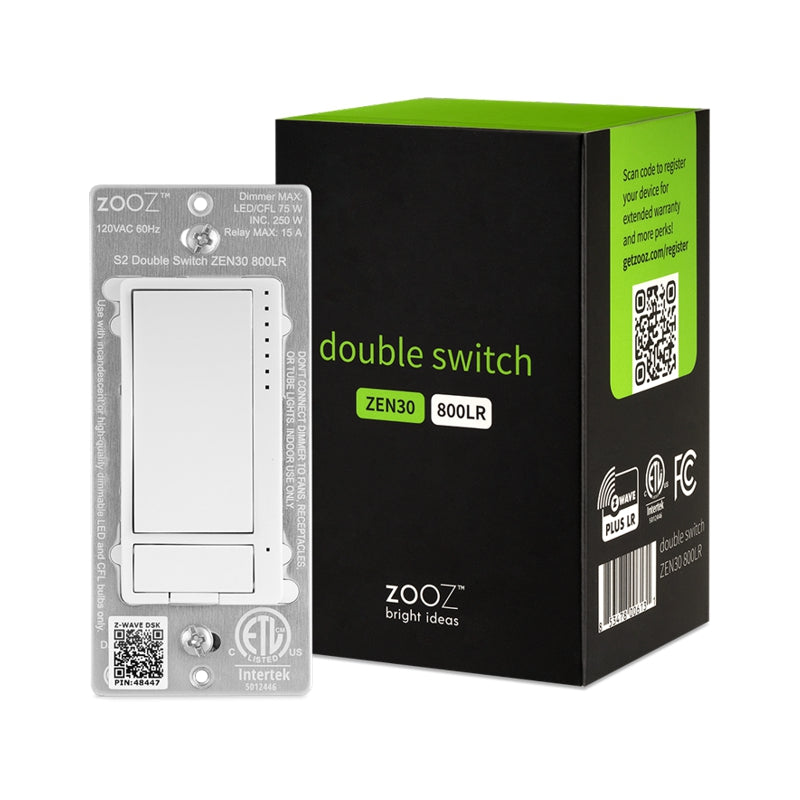
You asked, Zooz answered! One part light dimmer, one part 15A on/off relay, this Double Switch has endless use cases. Make it your go-to Z-Wave solution for existing stacked switches controlling a ceiling fan and lights on the fan. If you have two switches that control a fan and light separately (2 connections coming into the box, 1 for the motor and 1 for the light), use the Double Switch to combine them!
You can also use this device to control two sets of lights with one switch (one dimmable, one on/off), saving space in your box for another application. Or skip on the load for either the dimmer or relay, and use the Double Switch as a remote control for other scenes and devices in your Z-Wave network.
Besides fan control, the 15 A relay in the Double Switch is a dry contact that can be used in a variety of creative applications. Use it to add Z-Wave to an outlet receptacle or load from a different circuit.
The Double Switch supports OTA firmware updates so you’ll be able to take advantage of Zooz’s frequent upgrades and feature additions. And once added to your Z-Wave hub, the Double Switch will immediately start boosting Z-Wave signals to strengthen your connections and extend the range of other devices. It supports the newest S2 authenticated security protocol for secure communication, and its Z-Wave Plus 700 series chip ensures stable connections with your hub.
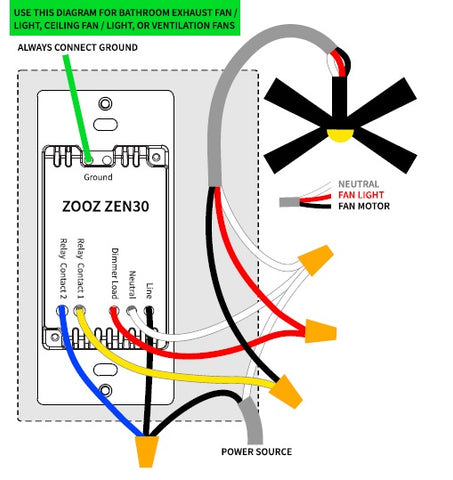
Please follow the manual carefully and refer to the supplied diagrams when installing your Zooz S2 switches. It's recommended that a licensed electrician performs the installation.
Check for neutral connections BEFORE you buy. A white wire from a 14-3 romex is usually NOT a neutral. Ask us if you're not sure what to look for, we'll be happy to help!

How to include the Z-Wave Plus S2 Double Switch to your smart home hub?
1. Make sure the switch is installed within range of your Z-Wave network
2. Put your Z-Wave hub in inclusion/pairing mode
3. Tap the upper paddle of the dimmer 3 times quickly to finalize the inclusion process
4. A new dimmer and on/off switch will appear on your controller's device list
NOTE: If you can't match your wiring with any of the diagrams included in the manual, let us know and we'll walk you through the wiring process.
We have several Fan/Lights in our home that I wanted to add to our Apple Home Control. A major component of our Home is Zwave, which is hosted by Home Assistant and the ZWA-2 controller, the Zwave devices are then exposed to Home via HA’s HomeKit Bridge. Enter Zooz, and their strong Zwave support, including the ZEN30 800 Double Switch — which is actually a dimmer and a switch in a single gang wall device. If you are considering adding control to your fan/light, this device is a very good choice.
The ZEN30 will allow you to switch and dim the light, and turn the fan on and off — it does not give you speed control of the fan. This last limitation may or may not work for you, I’d say it works best with fans you might currently use a double wall controller, but usually keep it on the same speed, or you use chains to control the speed (we’re in both groups, mostly one speed, but use chains if we want something different). Another requirement for this device is that you have the typical 3-wire connection between wall switch and fan/light. Also, as with almost any Zwave device, you need a hot, neutral, and ground at the switch location so the ZEN30 can have constant power.
The installation of the ZEN30 is pretty straightforward, again like most fan/light controls, there are wires coming out of the back of the switch (as opposed to the screw terminals you find on more simple switches), these connect to the line, neutral, and 3-wire load to the fan light. I should mention that you could use the ZEN30 to dim most lights, and then the switch — which is actually a relay — to control power on almost any device up to 15A.The Smart QR code addition of all Zooz products makes adding devices to your Zwave network quite easy.
I’ve now installed three of the ZEN30s on various Fan/Lights around the house, they all work great, and they’re all part of our Apple Home, in some cases we’ve added them to scenes for the area they’re iin — we will probably add at least one more. If this description fits your situation, I highly recommend Zooz and the ZEN30 — I’ve had a good experience with Zooz support too!
I recently converted my proch light from an old fixture with smart bulb to a new fixture, matching others on the house. I wanted to maintain smart control while using the Edison style bulb or a flame bulb for Halloween. The snag was that my existing switch was a dual switch controlling the porch light and an outdoor outlet.
The ZEN30 fit nicely in the same package, allows local control of both circuits, and game me smart control and automations for both. Integration into my Home Assistant setup was quick and easy.
Very satisfied with this purchase.
I've ordered from Zooz multiple times and for the most part, the switches have worked perfectly. Additionally, even when I do have an issue, the support (with real humans!) always delivers, whether it's helping me with a firmware bug or replacing a faulty unit and everything in between. I don't think I've ever encountered another company of any size with customer support as good as Zooz. Because of this and the quality of the product, I cannot picture myself ordering smart switches from any other company, ever. Thank you Zooz!
Worked perfectly to control both my bathroom fan and light with Home Assistant
I wanted to replace my combo switch that controls my walkin closet and a bedroom wall light. This worked perfectly. I can dim the wall light and control on and off for the closet. Easy inclusion to the network and easy useful settings in the parameters.