$33.95 $44.95
| /
NOTE: Z-Wave gateway controller required - sold separately. *Your hub needs to support advanced parameter input to display these features.
We may have this product available in open box, refurbished, or used condition - just check the variant buttons under the product price for availability. All of our recycled inventory has been tested for both manual and Z-Wave control and is fully functional at the time of shipment. Here is what you can expect when ordering your device:
Download the Manual for Zooz Z-Wave Plus S2 Double Switch ZEN30 800LR (PDF)
NOTE: If you don't see your Z-Wave controller on the list above, please contact us before you purchase this product.
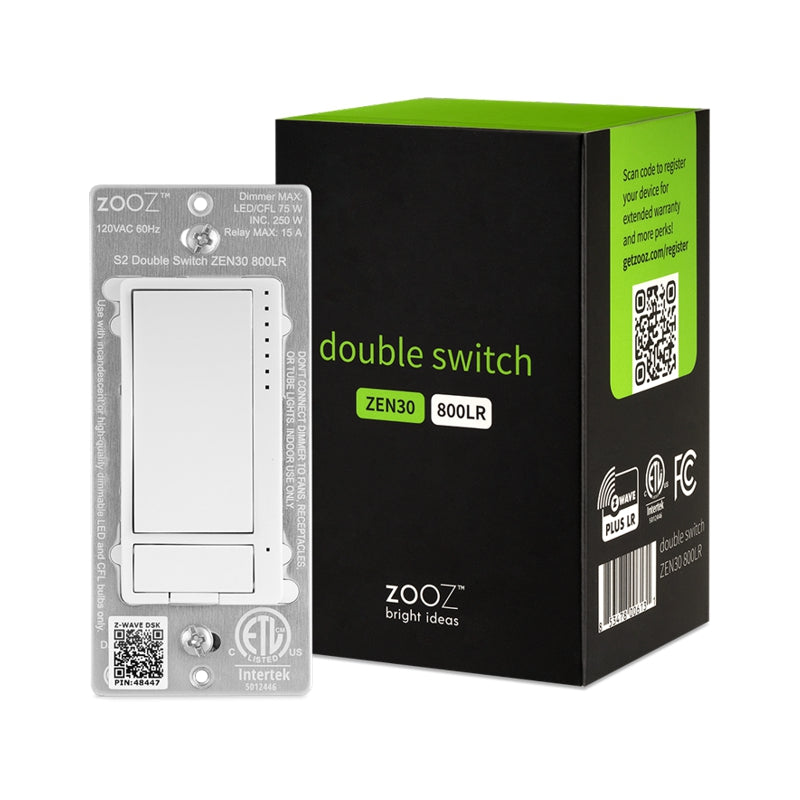
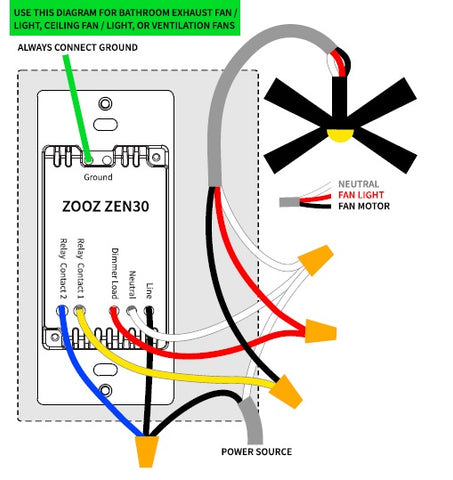
You asked, Zooz answered! One part light dimmer, one part 15A on/off relay, this Double Switch has endless use cases. Make it your go-to Z-Wave solution for existing stacked switches controlling a ceiling fan and lights on the fan. If you have two switches that control a fan and light separately (2 connections coming into the box, 1 for the motor and 1 for the light), use the Double Switch to combine them!
You can also use this device to control two sets of lights with one switch (one dimmable, one on/off), saving space in your box for another application. Or skip on the load for either the dimmer or relay, and use the Double Switch as a remote control for other scenes and devices in your Z-Wave network.
Besides fan control, the 15 A relay in the Double Switch is a dry contact that can be used in a variety of creative applications. Use it to add Z-Wave to an outlet receptacle or load from a different circuit.
The Double Switch supports OTA firmware updates so you’ll be able to take advantage of Zooz’s frequent upgrades and feature additions. And once added to your Z-Wave hub, the Double Switch will immediately start boosting Z-Wave signals to strengthen your connections and extend the range of other devices. It supports the newest S2 authenticated security protocol for secure communication, and its Z-Wave Plus 700 series chip ensures stable connections with your hub.
Please follow the manual carefully and refer to the supplied diagrams when installing your Zooz S2 switches. It's recommended that a licensed electrician performs the installation.
Check for neutral connections BEFORE you buy. A white wire from a 14-3 romex is usually NOT a neutral. Ask us if you're not sure what to look for, we'll be happy to help!

How to include the Z-Wave Plus S2 Double Switch to your smart home hub?
1. Make sure the switch is installed within range of your Z-Wave network
2. Put your Z-Wave hub in inclusion/pairing mode
3. Tap the upper paddle of the dimmer 3 times quickly to finalize the inclusion process
4. A new dimmer and on/off switch will appear on your controller's device list
NOTE: If you can't match your wiring with any of the diagrams included in the manual, let us know and we'll walk you through the wiring process.
I used this switch to replace two standard switches. Basically control two lights with one switch (one for kitchen lights, and what would be the fan light relay, I hooked in the back porch lights). Gives me so much more control and allowed for an extra switch to take the place of what was the porch light.
I have some of them working both alone and on virtual configuration (4-way). No complaint at all. I recommend it.
Easy setup in home assistant. Lots of parameters open for control. Wiring is simple you dont even need a diagram and leads already on unit make for quick install with wagos.
I had 7 Wifi Switches remaining in my smart home setup and even though these were guest room bathrooms and closets, it was time to replace them with z wave devices. the double switch was a perfect compliment to use in the guest bathrooms and have been working well. they added easily, setup was a breeze. I wish I had done this years ago.
Easy to include and setup. Dimmer works adequately. Overall, great value device. Using on an Indigo Domotics software platform.